A good HOA website does more than make a community look professional. It gives residents one dependable place to find information, complete common tasks and stay connected to what is happening in their neighborhood.
The best HOA websites help residents quickly answer questions such as:
- When is the next community event?
- Where can I find the rules and governing documents?
- How do I contact the association?
- Where do I submit a request?
- How do I access my resident account?
- What amenities are available?
- Where can prospective buyers learn about the community?
However, not every HOA website is equally useful. Some look attractive but make important information difficult to find. Others contain plenty of documents but offer little guidance for residents. The strongest HOA website examples combine clear navigation, current information, community branding and convenient access to resident services.
Below are five community websites worth studying, followed by a practical HOA website template and a breakdown of the features that can make your website more useful to residents, board members and community managers.
What Makes a Good HOA Website?
A good HOA website should serve both the people who live in the community and those who want to learn more about it.
Residents may visit the website to find an announcement, review a policy, check an event date or access their private account. Prospective residents, real estate professionals and vendors may be looking for community information, contact details or resale documents.
A useful HOA website therefore needs to do several things well:
- Explain the community clearly. Visitors should understand where the community is, what makes it unique and who manages it.
- Make common tasks easy to find. Resident login, contact information, documents, events and amenity information should not be buried.
- Separate public and private information. General community information can be public, while account details and sensitive documents should require secure access.
- Stay current. Outdated events, old alerts and expired announcements can cause residents to stop trusting the website.
- Work on mobile devices. Residents should be able to find information and complete basic tasks from a phone, tablet or computer.
- Reflect the community’s identity. Photos, colors, language and content should make the website feel specific to the community rather than like a generic template.
The following HOA website examples approach these goals in different ways.
5 HOA Website Examples Worth Studying
Not every example below is a traditional single-association HOA website. Some represent large community associations or master-planned communities. However, each offers useful ideas that HOA boards and community managers can apply to their own websites.
1. Lake Linganore Association: Connect the Public Website to Resident Services
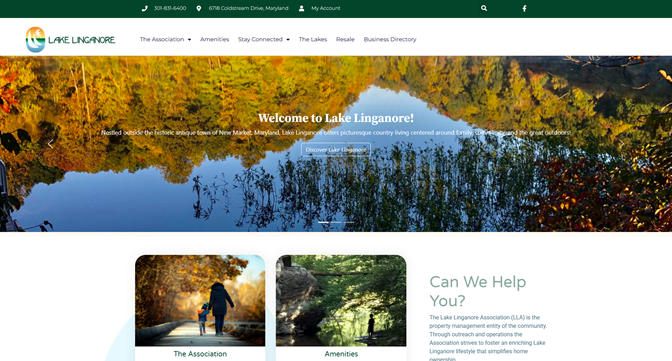
Lake Linganore Association provides a strong example of how a public-facing HOA website can introduce the community while directing residents to more secure services.
The homepage uses community photography and welcoming language to explain the Lake Linganore lifestyle. Its navigation organizes information into clear categories, including the association, amenities, communications, events, lakes, resale information and a business directory.
One of the most important elements is the prominent My Account link. Rather than trying to place every resident function on the public website, Lake Linganore directs residents to a secure Condo Control account for private community information and services.
What this HOA website does well
- Introduces the community through local photography and lifestyle-oriented messaging
- Makes contact information easy to locate
- Separates association information, amenities and community activities into understandable sections
- Provides a visible path to the secure resident account
- Includes information for residents, prospective buyers and people involved in resale transactions
What other HOAs can learn from it
Your public HOA website and resident portal do not need to be the same experience.
The public website can tell the community’s story, answer general questions and help new residents get oriented. The resident portal can handle private documents, requests, account information and resident-specific activity.
Connecting the two through a prominent login button gives residents a clear starting point without exposing sensitive information publicly.
2. Reston Association: Put High-Value Resident Tasks First
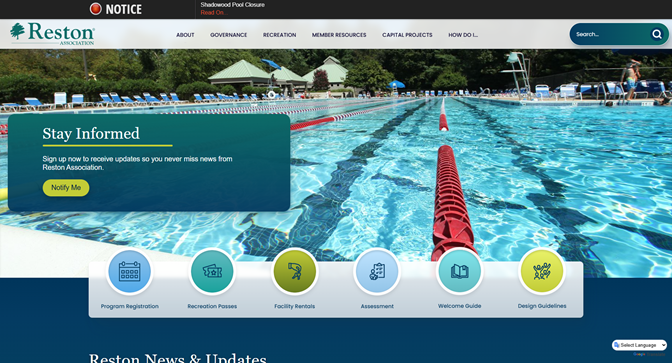
Reston Association manages a large and active community with extensive recreational facilities, programs, environmental initiatives and governance responsibilities. Its website reflects that complexity by prioritizing the actions residents are most likely to take.
Near the top of the experience, residents can access program registration, recreation passes, facility rentals, assessment information, a welcome guide and design guidelines. The website also gives significant space to notices, operational alerts, community news and upcoming activities.
What this HOA website does well
- Provides direct access to frequently used resident services
- Publishes time-sensitive alerts prominently
- Maintains an active stream of community news and updates
- Supports recreation, facility use, governance and environmental communication
- Gives residents practical information instead of relying only on promotional content
What other HOAs can learn from it
An HOA website homepage should not force residents to search through several menu levels to complete a common task.
Start by identifying the five or six reasons residents contact the board or management team most often. These may include:
- Paying assessments
- Registering for an event
- Reserving an amenity
- Reviewing architectural guidelines
- Reporting a maintenance concern
- Finding a form
- Contacting management
Turn those common needs into visible homepage links.
This simple change can make the website more useful while reducing repetitive calls and emails to community staff.
3. Lakewood Ranch: Organize the Website Around Different Audiences
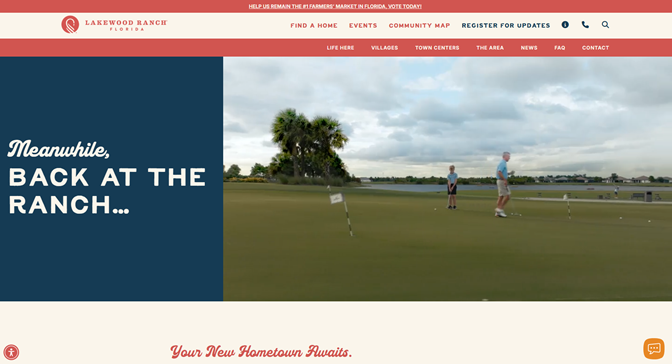
Lakewood Ranch offers an excellent example of community branding and audience-based navigation.
The website uses strong photography and lifestyle-focused content to communicate what it is like to live in the community. Its navigation helps visitors explore homes, villages, events, town centers, parks, trails, schools, shopping, dining and other community resources.
It also separates content for prospective residents from the dedicated For Residents experience. Visitors considering a move can explore homes and neighborhoods, while current residents have a distinct path to resident-specific information.
What this community website does well
- Uses high-quality images to communicate the community lifestyle
- Organizes information around what different visitors want to accomplish
- Provides home-search and neighborhood-exploration tools for prospective residents
- Promotes events, amenities and local destinations
- Separates resident resources from marketing-oriented content
- Uses maps and location information to help visitors understand the community
What other HOAs can learn from it
Your HOA website may serve more audiences than you realize.
A current homeowner, prospective buyer, realtor, vendor and new resident may all arrive with different questions. Instead of placing every visitor into the same navigation path, consider creating clear sections such as:
- Current Residents
- New Residents
- Prospective Buyers
- Realtors and Resale Professionals
- Vendors
- Board and Governance
Even a smaller association can use this approach. The website does not need to be large, but it should acknowledge that different visitors need different information.
4. Columbia Association: Make a Complex Organization Easier to Understand
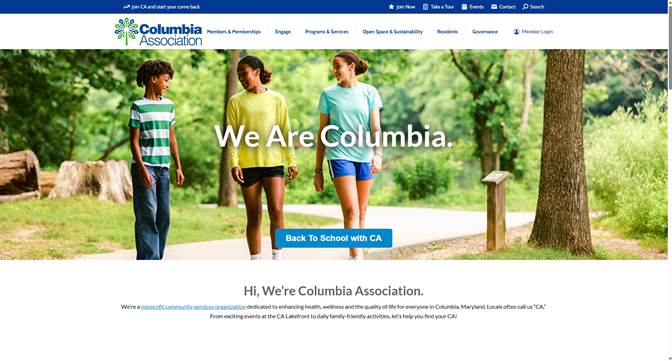
Columbia Association provides a wide range of services, including memberships, fitness, recreation, classes, camps, community programs, facilities, open-space management, sustainability initiatives and governance.
Its website organizes this large amount of information into task-oriented categories. Residents can access the community app, member login, pool status, classes, schedules, facilities, interactive maps, annual-charge information and governance resources.
The website also includes a helpful Who Handles What? resource, recognizing that residents may not always know which organization or department is responsible for a particular issue.
What this community website does well
- Organizes many programs and services into understandable categories
- Provides access to real-time information such as pool status
- Gives residents clear paths to apps, schedules, memberships and facilities
- Makes governance and board information accessible
- Uses interactive maps and resident resources
- Helps visitors determine which department handles a specific concern
What other HOAs can learn from it
Residents do not always understand the internal structure of an association – and they should not need to.
Your website navigation should reflect the language residents use, not necessarily the departments your organization uses.
For example, a resident is more likely to look for:
- Report a problem
- Request approval
- Reserve a room
- Find a document
- Contact the board
- Pay my assessment
They may not know whether those tasks belong to operations, administration, property services or another department.
Organizing an HOA website around resident intentions can make even a complex association feel easier to navigate.
5. The Villages: Use Lifestyle Content to Build Community Identity
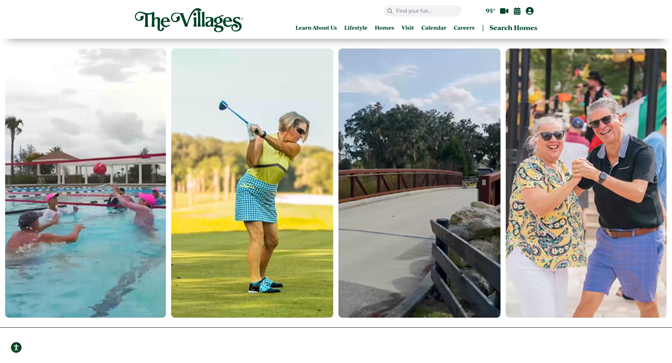
The Villages website focuses heavily on storytelling, activities and the lifestyle available within the community.
Visitors can explore golf, recreation, trails, parks, entertainment, shopping, dining, health and wellness, homes and community events. The website also offers maps, home-search tools, visitor resources, live entertainment information and webcams.
Its language encourages visitors to imagine themselves participating in the community rather than simply reading a list of amenities.
What this community website does well
- Creates a clear and memorable community identity
- Uses lifestyle-oriented language instead of administrative language
- Organizes a large number of amenities into simple categories
- Keeps events and entertainment highly visible
- Provides interactive tools, maps and dynamic content
- Gives prospective residents clear next steps
What other HOAs can learn from it
An HOA website should not be limited to rules, meeting minutes and payment instructions.
Those resources are important, but residents also want to see what makes their community enjoyable. Consider including:
- Community photos
- Resident events
- Clubs and committees
- Volunteer opportunities
- Parks and amenities
- Local businesses
- Community accomplishments
- Welcome information for new residents
A website that celebrates the community can strengthen engagement while presenting the neighborhood more positively to prospective buyers.
What the Best HOA Websites Have in Common
The examples above vary significantly in size, audience and purpose. However, the strongest HOA websites tend to share several characteristics.
| Website element | Why it matters |
|---|---|
| Clear resident login | Residents can quickly move from public information to secure services |
| Task-based navigation | Visitors find what they need without understanding the association’s internal structure |
| Current announcements | Residents learn to trust the website as a source of timely information |
| Event calendar | Meetings, activities and deadlines are available in one place |
| Mobile-responsive design | Residents can use the website from any device |
| Public and private sections | Sensitive information remains protected while general information remains accessible |
| Search functionality | Residents can locate documents, forms and policies more quickly |
| Community photography | The website feels specific to the neighborhood |
| Contact and help options | Residents know where to direct questions |
| Organized document access | Rules, forms, minutes and policies are easier to find |
| New-resident information | Owners and tenants can understand how the community operates |
| Consistent branding | The association presents a professional and recognizable identity |
A visually attractive website is valuable, but usability should come first. Residents will return to the website when it consistently helps them accomplish something.
HOA Website Templates: A Practical Starting Point
HOA website templates can make it easier to organize content, but the template should reflect how residents actually use the website.
Instead of starting with colors and homepage images, begin with the information architecture. Decide what should be public, what should require a resident login and which actions deserve the most visibility.
Recommended Public HOA Website Pages
A practical public website structure may include the following pages.
1. Home
The homepage should quickly introduce the community and direct visitors to the most important information.
Include:
- A short community introduction
- A resident login button
- Current alerts
- Quick links
- Recent announcements
- Upcoming events
- Contact information
- Community photography
2. About the Community
Explain the community’s history, location, size, amenities and identity.
This page may also introduce the association and explain its role.
3. Board and Governance
Provide appropriate information about:
- Board members
- Meeting schedules
- Committees
- Elections
- Governing structure
- Opportunities to volunteer
Sensitive board materials should remain within a secure resident portal when appropriate.
4. News and Announcements
Create one reliable location for association updates.
Allow older announcements to remain searchable without letting outdated content dominate the homepage.
5. Events and Calendar
Include:
- Board meetings
- Committee meetings
- Social events
- Maintenance dates
- Amenity closures
- Election deadlines
- Community programs
6. Amenities
Explain what amenities are available, where they are located and how residents can access or reserve them.
7. Documents and Forms
Organize public documents into categories instead of publishing one long list of files.
Possible categories include:
- Governing documents
- Rules and regulations
- Architectural guidelines
- Applications
- Meeting information
- Resale information
- Community maps
Publish only the documents that should be publicly accessible. Private or resident-specific records should remain behind a secure login.
8. New Resident Information
Help new owners and tenants understand:
- How to register
- How to contact management
- Where to find community rules
- How to access amenities
- How to submit requests
- How to receive announcements
- Where to find important documents
9. Contact
Provide clear contact options for management, the board and emergency or after-hours concerns.
Avoid using one generic form for every issue when different requests require different departments or workflows.
Recommended Resident-Only Pages and Tools
The secure section of an HOA website or resident portal may include:
- Account balances and payment history
- Online assessment payments
- Maintenance and service requests
- Amenity reservations
- Architectural or modification requests
- Violation information
- Private documents
- Board packages and meeting materials
- Resident directories
- Online voting
- Surveys
- Personalized announcements
- Package, parking or visitor information where applicable
HOA Website Homepage Template
A useful homepage can follow this order:
1. Alert Bar
Use this space for urgent or time-sensitive notices, such as closures, service interruptions or meeting deadlines.
2. Hero Section
Include a strong community photo, a short introduction and two clear actions:
- Resident Login
- Contact the Association
3. Quick Actions
Display four to six of the most common resident tasks.
For example:
- Make a Payment
- Submit a Request
- Reserve an Amenity
- Find a Document
- View the Calendar
- Contact Management
4. Latest Announcements
Show only the most relevant recent updates, with a link to view all news.
5. Upcoming Events
Display the next few meetings, activities or deadlines.
6. Community Resources
Highlight frequently requested documents, forms or guides.
7. Community Feature
Use this section for an amenity, volunteer opportunity, resident program or neighborhood story.
8. Help and Contact Information
End the page with clear instructions for getting assistance.
This structure can be adapted to most HOA website templates, whether the association uses a professionally designed website or an HOA website builder.
HOA Website vs. Resident Portal
An HOA website and resident portal serve related but different purposes.
| Public HOA website | Secure resident portal |
|---|---|
| Introduces the community | Provides personalized resident information |
| Supports prospective residents and realtors | Requires an authenticated login |
| Publishes public news and events | Stores private documents and records |
| Promotes amenities and community identity | Supports payments, requests and bookings |
| Provides general contact information | Displays account or unit-specific activity |
| Helps visitors learn about the association | Supports board, resident and management workflows |
A public HOA website is primarily a communication and discovery tool. A resident portal is a secure workspace.
The strongest approach connects the two.
Residents should be able to start on the public website, select a clearly visible login button and enter a secure system without wondering whether they are in the correct place. The branding and navigation should feel connected even when the public and private experiences serve different purposes.
How to Choose an HOA Website Builder or HOA Website Software
A general website builder may be enough for a small community that only needs a few public pages. However, associations that want resident accounts, private documents, payments, requests, online voting or amenity booking may need HOA-specific website software.
When comparing options, consider the following questions.
Is It Designed for Community Associations?
A specialized platform is more likely to understand the difference between board members, owners, tenants, managers and public visitors.
Can the Board or Management Team Update It Easily?
Routine changes should not require a developer.
Administrators should be able to publish an announcement, update an event, upload a document and change basic page content without technical assistance.
Does It Work on Mobile Devices?
Review the website from a phone before choosing a template or provider. Menus, documents, forms and login buttons should all remain easy to use on a smaller screen.
Does It Support Public and Private Information?
The platform should allow administrators to control who can see different pages, documents and features.
Can It Connect to Resident Operations?
Consider whether the website connects to:
- Communications
- Documents
- Payments
- Maintenance requests
- Amenity booking
- Resident records
- Elections
- Surveys
A disconnected website may create additional work if staff must publish the same information in multiple places.
Does the Provider Offer Implementation and Support?
Ask who will build the initial website, move existing content, organize pages, train administrators and provide help after launch.
Can the Website Grow with the Community?
An HOA website may begin with announcements and documents, but the association may eventually need online forms, payments, voting, reservations or integrations.
Choose a platform that can support future needs without requiring the community to start over.
Common HOA Website Mistakes to Avoid
Even well-designed HOA websites can become difficult to use over time.
Watch for these common problems.
Hiding the Resident Login
The login button should be visible in the main navigation and on the homepage. Residents should not need to search for it.
Publishing One Large Document Library
A long, unorganized list of files is not helpful. Group documents by purpose and use clear file names.
Leaving Outdated Announcements Online
Expired alerts and old homepage news make the website appear neglected. Archive older content and keep the homepage current.
Organizing the Website Around Departments
Residents may not know which department handles their concern. Organize navigation around tasks and questions instead.
Using a Generic Template Without Community Identity
Stock photography and vague copy can make the website feel disconnected from the neighborhood. Use real community images and language.
Placing Private Information on Public Pages
Resident records, private meeting materials and account-specific information should require secure access.
Ignoring Mobile Usability
A page that works on a desktop but is difficult to navigate on a phone will frustrate residents and reduce adoption.
Treating the Website as a Static Brochure
Residents are more likely to return when the website includes useful actions, current information and regularly updated resources.
Build an HOA Website Residents Will Actually Use
The best HOA website examples demonstrate that design is only one part of the experience.
A useful HOA website should help residents find answers, access services and participate in their community. It should also help boards and managers communicate more effectively, reduce repetitive questions and maintain one dependable source of community information.
Whether you start with HOA website templates or replace an outdated site, focus first on resident needs:
- What information do residents request most often?
- Which tasks generate the most calls and emails?
- What should be public?
- What should require secure access?
- How will the website stay current?
- Who will maintain it?
- How will it connect to the resident portal?
Condo Control builds responsive public websites for condos, HOAs and property management companies. Communities can use a customized domain, showcase community images and create a centralized online location for residents and prospective buyers. The public website can also provide a clear path into the broader resident experience.
A well-planned HOA website does not simply put information online. It makes community information easier to find, resident services easier to access and the association easier to engage with.
Ready to create a more useful website for your community? Book a Condo Control demo to see how your public HOA website and resident platform can work together.