More than 78.1 million Americans now live inside an HOA, condo association, or co-op, spread across an estimated 373,000 associations nationwide. For most of those residents, they already do online banking, manage subscriptions, and order stuff online. So they expect their associations to be run in a similarly convenient manner. And interestingly, things are moving from what residents expect to laws.
Florida has already made a website a legal requirement for a large share of condo and HOA communities, and that’s a preview of where state laws are heading everywhere, not a Florida-only quirk. And a HOA website isn’t just a website. Researchers at Carleton University found that people form an opinion about whether a website looks credible in roughly 50 milliseconds, based almost entirely on layout and polish. A resident who lands on a cluttered, outdated site takes that as a reflection of the state of HOA management.
And here’s what makes this hard for HOA boards: there are volunteers almost always on top of a full-time job elsewhere, and very few are web developers. It’s very easy for them to think a generic website is great for their association, yet the residents see otherwise. The good news is that in this guide, I’ll walk you through the important features of an HOA website, give you 5 HOA website examples worth studying, and then show you the best HOA website builder software.
Why your HOA needs a website

It reduces routine questions
Most calls to the board are things a resident would happily look up themselves if there were somewhere to look. Harvard Business Review found 81% of customers would rather solve a simple problem on their own than call or file a request. Reframe that for your community and the math holds up the same way: “order status” becomes “when’s my payment due,” “invoice” becomes “financial statement,” and every resident who can check it online is a call your board doesn’t have to take.
It keeps closings from stalling
A resale package (governing documents, budget, insurance, and a statement of what’s owed) commonly takes 7 to 10 business days to produce, longer if your association is self-managed and working from paper files. In states like Texas, if anything in that package raises a flag, say dues that jumped or an undisclosed special assessment, the buyer has a contractual window to walk away from the deal and get their deposit back. When your documents are already posted and current, producing that package becomes a matter of exporting what already exists instead of digging through a filing cabinet.
It survives board turnover
Boards change, and whatever lived only in a volunteer’s inbox or personal filing cabinet often goes with them when they leave. A website or portal that isn’t tied to any single person’s email account turns your association’s records into something that belongs to the community, not whoever happens to be secretary this year.
It becomes your community’s lifeline during emergencies
Florida’s HB 293 now requires HOAs to keep a written emergency plan on file and share hurricane-preparedness information with residents every year, effectively pushing boards toward the kind of centralized, always-on channel a website provides. Unlike a landline or a physical office, a site residents can reach from their phone keeps working over cellular data long after the power’s out.
Is an HOA website legally required?
Mostly, not yet, but that “mostly” is shrinking every legislative session. There’s no federal law requiring it. Every requirement that exists lives at the state level. But it’s worth mentioning that even in a state with no website statute at all, your association almost certainly already has a legal duty to produce governing documents, budgets, and minutes when an owner asks. A website doesn’t create that obligation. You already have it. It just decides whether meeting that obligation takes a few minutes or several days. That said, here’s a breakdown of requirements from different states:
| State | Who’s Covered | Requirements |
|---|---|---|
| Florida (Condos) | 25+ units | Website or secure portal: governing documents, budgets, meeting notices, 12 months of minutes, active contracts/bids, reserve studies |
| Florida (HOAs) | 100+ parcels | Governing documents, budgets, contracts, insurance, minutes, notices |
| Texas | Subdivisions of 60+ lots, or any POA using a management company | Post recorded governing documents online |
| Nevada | Communities of 150+ units | Secure website or portal with governing documents, budgets, minutes; can accept payments if the association carries cybersecurity insurance |
| Wisconsin | Condo associations of 100+ units | Password-protected website, self-run or third-party |
| California | None currently (AB 548’s requirement was repealed) | Davis-Stirling Act still requires records to be disclosed to owners on request, just not necessarily online |
| Illinois | None | Boards must produce records, budgets, and notices whenever an owner formally asks |
Important features for HOA websites
Florida and Texas have effectively drafted part of your feature list already: a secure login, a place to store documents, and a way to post notices. Here’s the full list, and why each one earns a spot.
Secure resident login
A password-protected area is required by statute in Florida, Texas, and Nevada, and for good reason. Association records typically include full names, addresses, banking details, and occasionally Social Security numbers. IBM’s 2025 Cost of a Data Breach report puts the average global breach at $4.44 million, enough to erase the reserves of nearly every association out there. A gated login is what stands between a normal records request and a breach.
A document library
Under Florida’s HB 1203, associations with 100+ parcels must publish governing documents, budgets, and meeting materials within 30 days of creation, and boards have 10 business days to respond to a records request or face a presumption of willful violation, with penalties starting at $50 a day (California gives 10 business days for current-year records, 30 calendar days for the prior two years). Beyond compliance, a searchable library saves everyone from digging through a shared drive full of files.
A community calendar
Boards need to post meeting notices within a defined window beforehand. A calendar that sends its own reminders and syncs to a resident’s phone satisfies that requirement without anyone needing to remember to mail a notice.
A payment portal
A paper check takes 5 to 10 days to mail, deposit, and clear, versus 2 to 3 days for an online payment and 1 to 2 days by ACH. The bigger effect may be on behavior: a Consumer Financial Protection Bureau working paper found a 17% delinquency rate among residents paying manually, versus just 6% for those enrolled in autopay. Having a website that supports online payment might be the single most effective step a board can take to improve collections.
Maintenance and architectural request forms
With nothing in writing, there’s no way to confirm what was submitted or whether the board followed up. That’s a risk with architectural requests, which carry a 30- to 45-day response deadline. And if you miss it in certain states, the request becomes automatically approved regardless of what the CC&Rs say (in California, a board that misses a 45-day window on a solar panel request has approved it by default under Civil Code § 714). A digital form logs the exact date a request came in and gives the board a live list of what’s still pending.
Digital bulletin boards
The average American checks their phone close to 200 times a day, and no amount of clubhouse foot traffic competes with that. A digital board also timestamps every post, so if an owner later insists no one told them about a special assessment vote, there’s a record. Look for a platform that lets you flag something urgent.
Amenity booking
A sign-up sheet on a clubhouse door can’t catch two households claiming the same Saturday for the pool cabana. Appointments booked online run a 1.8% no-show rate versus 5.9% for the same type of booking made offline. An online system checks real availability before confirming, and some handle deposits, usage rules, and waitlists automatically.
E-voting
CAI’s incoming 2026 Homeowner Satisfaction Survey found 88% of residents vote in national elections, but only 69% vote in their own associations. Roughly 40% of HOA annual meetings fail to reach quorum on the first try as a result, triggering a costlier second meeting. Communities that paired a longer online voting window with reminders have seen turnout climb from 15% to 70%. So, I suggest you get a platform that supports online voting.
Important design standards
A site can have every feature above and still go unused if it fails on the basics: does it work on a phone, does it load fast, is it safe to enter a credit card into, and can every resident actually navigate it? Here are the important design standards.
- Mobile responsive: Roughly 62 to 64% of website visits worldwide now happen on a phone, and Google has ranked pages by their mobile version, not the desktop one, since 2018. So, make sure the website is mobile responsive.
- Fast load times: Google’s research found the odds of a visitor bouncing rise 32% as load time stretches from one second to three, and on mobile alone, more than half abandon a page past that three-second mark. So, make sure the website loads fast.
- Secure: Somewhere between 95% and 99% of web traffic already runs over encrypted HTTPS, and Chrome plans to warn visitors by default before they can open an unencrypted site, starting with version 154 in October 2026. Confirm your platform offers encrypted hosting and a PCI-compliant payment processor before signing anything.
- Accessible: The CDC puts the share of U.S. adults living with a functional disability at 28.7%, nearly half once you isolate adults over 65, an age range HOA communities already skew toward. At the same time, ADA digital accessibility lawsuits have grown to 4,928 filed in 2025 alone. So, I suggest you get a website that’s ADA-compliant.
5 HOA website examples
1. Lake Linganore Association (New Market, MD)
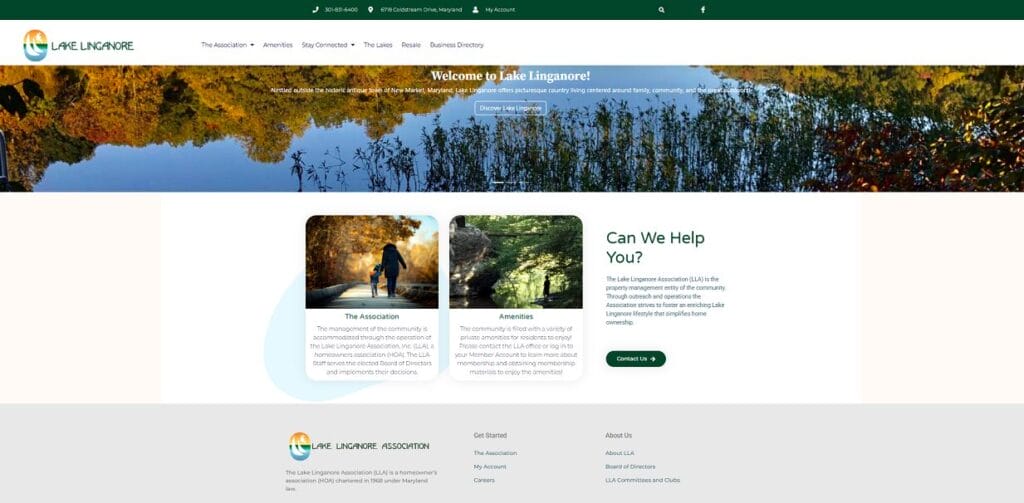
Lake Linganore Association covers more than 3,000 properties and 10,000+ residents, and its site groups navigation into umbrella categories (The Association, Amenities, Stay Connected) instead of stacking links across the top. It also archives its newsletter back to 1996 as downloadable PDFs, runs a standalone Resale page for agents and buyers, and keeps its “My Account” login consistently labeled in the header and footer.
2. Del Mar Shores Terrace (Solana Beach, CA)
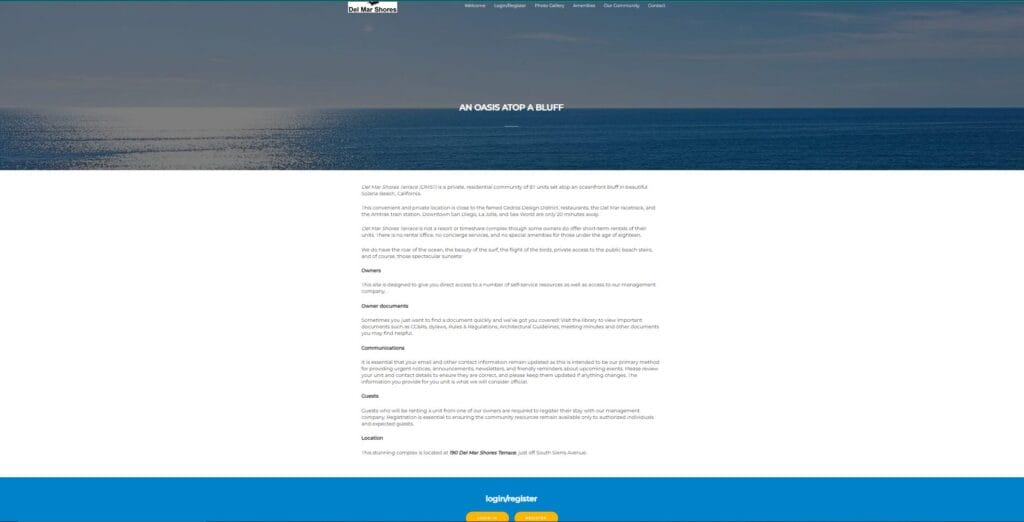
Del Mar Shores Terrace is an 87-unit oceanfront condo community using a single scrolling homepage, right-sized for its scale. What stands out is how the board manages expectations directly on the homepage, stating plainly that it’s not a resort or timeshare, with no concierge or amenities for young children, and requiring guests renting from an owner to register in advance. Hyperlocal touches like a surf report, tide forecast, and earthquake preparedness kit make the site feel built by someone who actually lives there.
3. Surfsong Owners Association (Solana Beach, CA)
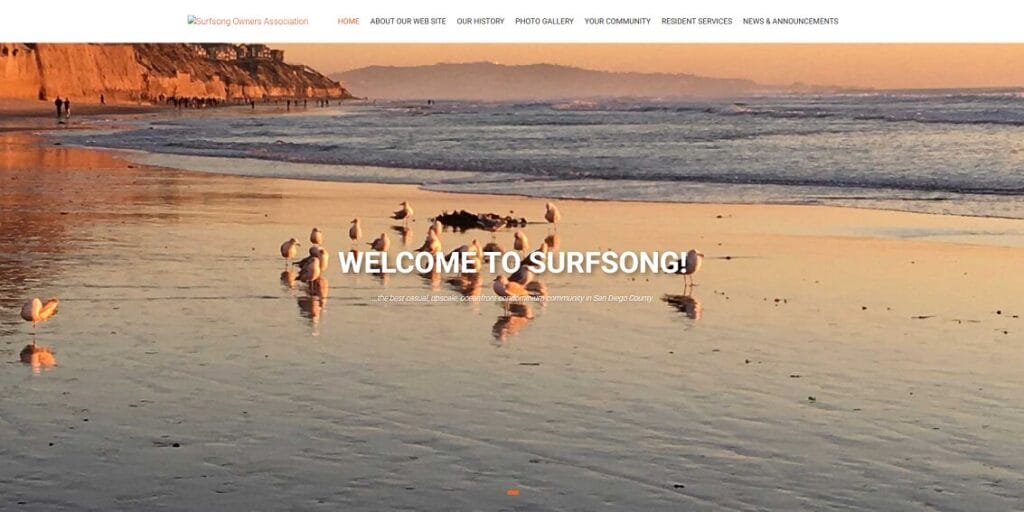
Surfsong Owners Association is a 72-unit community that explains itself. Instead of dropping a row of portal links and hoping residents figure them out, the homepage walks through what the login unlocks and what’s inside its searchable document library. That’s worth stealing directly: a lot of “why is everyone still calling the office” comes down to residents never realizing what’s already sitting behind a login they’ve never clicked.
4. Deering Bay Marina Association (Coral Gables, FL)
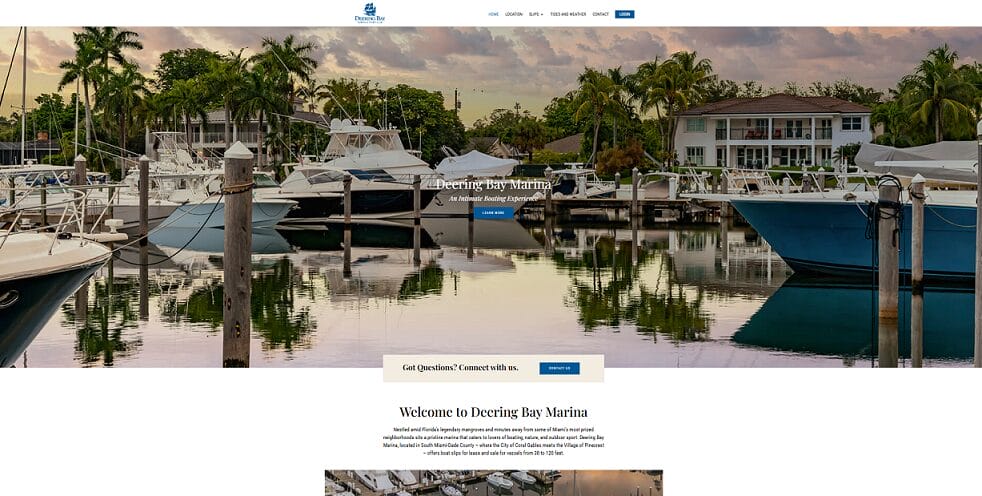
Deering Bay Marina Association isn’t a residential HOA at all. It’s a private marina association holding 94 slips that accommodate vessels from 30-120 ft, and a good demonstration of how far the same fundamentals stretch for a non-typical membership. A tides-and-weather widget on the homepage and a contact form beside the dockmaster’s direct line show the model worth studying: the same underlying structure, built around whatever actually makes your membership different.
5. Villas of Papillon (Sarasota, FL)
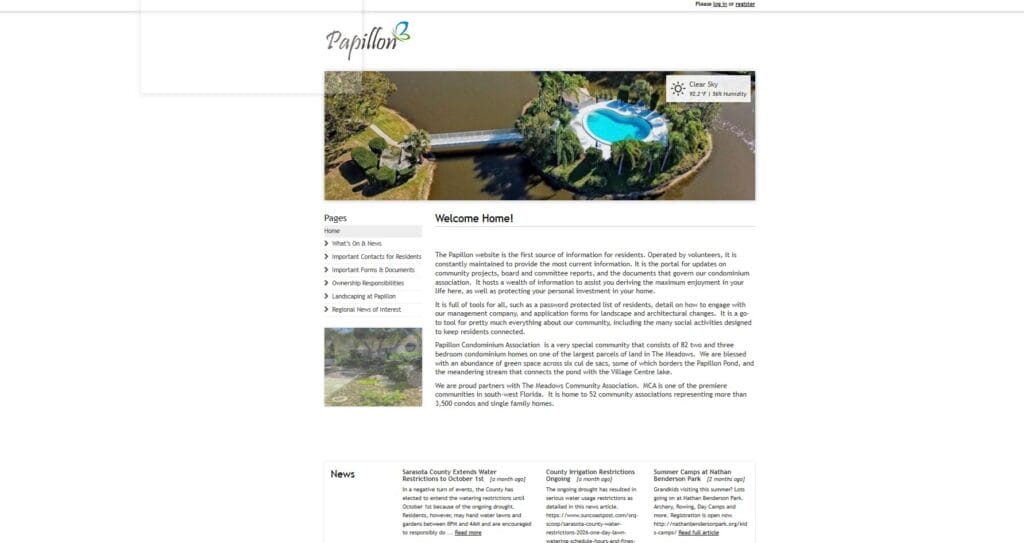
Villas of Papillon is a document-heavy site, geared toward volunteer boards rather than management companies. It posts recordings of board meetings, not just written minutes, alongside a closing checklist for the handful of times a year a unit changes hands and a page listing board members’ completed director ’s-course certificates.
Top HOA website builders and software
Once you’ve mapped out what you want the site to do, the decision narrows to two paths: a general-purpose platform or software built specifically for HOAs. A general builder is cheaper and more flexible, but leaves everything HOA-specific, like a directory, a private minutes page, or dues tied to what each household owes, for your board to set up and connect. HOA-specific software builds those pieces in from day one. Here’s how the builders compare.
General website builders
For this, none has HOA-specific features built in. A password-protected page, a real directory, and dues collection tied to owner balances are all things you’ll need to add yourself.
Wix
Wix ranks best for design flexibility according to WebsiteBuilderExpert, backed by a template selection well past 2,000 options. It runs $17 to $159 a month ($29 Core plan minimum for online payments). Its free Members Area gives every resident an individual login at no extra charge, though it’s also the hardest of the three to actually build in.
GoDaddy
GoDaddy bets on speed: describe your community in a sentence, and its AI builder generates a working site in under 30 seconds. Pricing for the AI builder starts around $10 per month for Starter, $25 per month for Professional, and $100 per month for Ultimate, if billed annually. The tradeoff is flexibility. Templates run more basic and run more rigidly.
Squarespace
Squarespace is rated easiest to actually use in WebsiteBuilderExpert’s 50-participant testing, thanks to a grid-based layout that’s hard to make look visually off. It runs $16 to $99 a month. Every paid plan already includes a free way to lock a single page behind one shared password, enough to keep a “Board Documents” page out of public search results. Individual resident logins require a separate Member Areas add-on, running $9 to $35 a month extra.
HOA-specific website and communication platforms
These start from a resident portal, payment processing, and a document library already built. Your board is mostly configuring those pieces rather than assembling them from nothing, typically with more hands-on setup help than a general builder’s self-service approach.
HOA Sites
HOA Sites has been building association websites since 2001, with a dedicated project manager building your site around your specific community rather than a template. It holds a 4.8-star rating across 71 verified Capterra reviews. Pricing is an annual rate combining a one-time setup fee with an ongoing service charge, and accounts are unlimited, so cost doesn’t creep up as your community grows.
PayHOA
PayHOA puts more weight on financial tools such as invoicing, recurring dues, autopay, bank reconciliation, and cash/accrual reporting, plus an owner portal, document storage, and violation tracking. It’s rated 4.7 stars across 607 SoftwareAdvice reviews. Pricing scales with unit count, running about $49 a month up to 25 units and climbing to a $249-a-month floor for 401-500 units, then $0.55 per unit for 500+ units, though every tier, even the smallest, gets the full feature set.
HOA Express
HOA Express is the least expensive of the three, roughly $15 to $89 a month when billed annually, with a free version for smaller associations. But the limitation is that it centers on resident engagement, such as payments, visitor tracking, surveys, forums, and newsletters, rather than deep management tools. Also, reviewers note limits on template customization.
All-in-one community association management platforms
This tier handles accounting, maintenance requests, vendor management, and board governance alongside the website, which makes it a better fit for a professional management company or a larger self-managed HOA than a small volunteer board just getting started.
Condo Control
Condo Control was built specifically for community associations back in 2011, and it targets medium-to-large condo corporations. Budgeting, invoice management, payments, resident and board communication, visitor parking, digital security monitoring, work order tracking, and amenity booking all route through one shared system. Pricing is based on unit count, not login count. The platform has a 4.7-star rating out of 163 reviews on Software Finder.
AppFolio
AppFolio started as a general property management platform (residential, commercial, student housing), with HOA features as one module rather than the main focus. It requires a minimum of 50 units just to open an account. Several independent comparisons note that it lacks native electronic voting, its architectural-review tools run less developed than HOA-first competitors, and reviewers at that scale flag a mobile app that lags behind the desktop version.
Buildium
Buildium is also rooted in rental-property management, but was acquired by RealPage in 2019. Its strength is accounting depth: GAAP-compliant reporting, full audit trails, and reserve funds kept properly separate from operating funds. Tiered pricing runs roughly $62 to $400 a month, but it’s worth watching for add-ons. On Software Finder, Buildium has a lower rating of 4.5 stars out of 73 reviews, compared to Condo Control’s 4.7 stars.
Final thoughts
Most of what separates a website residents actually use from one that gets bookmarked and residents go back to their routine inquiry phone calls comes down to two decisions: matching the software to what your residents need. Residents need a portal where they can access governing documents, financial reports, submit maintenance requests, and make payments. Everyone else just needs a clear front door. I don’t recommend generic site builders because of the ever-evolving state laws. Go custom. Start with what your state actually requires, layer in the features that solve your community’s specific pain points, and pick a platform that scales with your community.